
What is BYANA?
BYANA is an adaptive, AI-powered app for adults with attention challenges, sensory overload and cognitive overwhelm, particularly in the context of ADHD/ADD.
BYANA combines AI with a curated knowledge library and translates knowledge into practical, everyday steps: short exercises, clear next actions and psychoeducation — helping you juggle less in your head and move more easily into action.
Important: BYANA is not a therapy, does not provide a diagnosis and does not replace medical or psychotherapeutic treatment.
Quick Start - How to use BYANA?
- Download the BYANA app from the Apple App Store or Google Play Store. Open the app and create an account — either via single sign-on or individually with your email address.
- Then answer the screening questions. Your personal score will be shown in your profile.
- To get support, tap the chat icon and ask your question. For example:
“I feel completely overstimulated – what can I do right now?”
“I might have ADHD – can you tell me more about it?”
“I have ADHD – how can you help me?”
“What does my score say about my biggest challenges?”
You will receive immediate support, knowledge and strategies: clear suggestions, small next steps and answers to your questions.
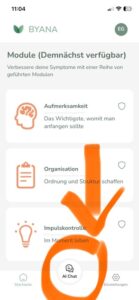 Pro tip for quick impact: Start with a specific problem in the here and now – such as “I’m stuck,” “I’m procrastinating,” or “I feel overwhelmed” – instead of starting with a big life goal.
Does BYANA use AI?
Yes.
The BYANA chatbot is powered by AI and supported by our curated knowledge library. The AI helps identify relevant strategies based on your context, make them easy to understand and translate them into practical micro-steps.
Does BYANA only use AI?
No. BYANA also uses a curated ADHD knowledge library developed by BYANA in collaboration with psychologists, as well as additional features that work without AI.
Transparency
We clearly label AI-supported content in line with the transparency requirements of Article 50 of the EU AI Act. You acknowledge this when creating your account, and BYANA also provides transparency notices at relevant points during the conversation whenever content is AI-supported
Do I need an account?
Yes. To make sure your access, settings and personalized experience work reliably, you need an account for your sign-in.
You can create an account individually with your email address or use single sign-on with Apple or Google — just use the Apple or Google buttons when signing in.
Profile settings
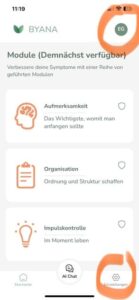
In your profile, you can adjust settings such as your language, country and chat name.
You can also see your current screening score there. You can repeat the questionnaire at any time.
I forgot my password
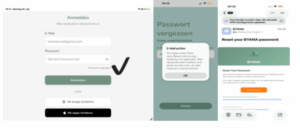
Use the “Forgot password” link on the login screen. You will receive an email with instructions to reset your password.
-
After that, you can change your password directly via the button in the email. Please make sure to use at least 8 characters for a secure password.
I did not receive a confirmation email
Please check the following:
Your spam folder
Possible typos in your email address
Wait 5 minutes and try sending it again
If it still does not work, please contact us at:
Can I use BYANA on multiple devices?
Yes. You can use BYANA on multiple devices with the same sign-in.
BYANA is available for Apple devices such as iPhone and iPad, as well as for Android phones and tablets.
How do I delete my account?
You can delete your account in the app under:
Settings → Account → Delete account
Please note: Account deletion is permanent.
What data does BYANA store - and how is it anonymized?
BYANA deliberately separates your sign-in profile from your chat profile.
Sign-in profile / identity layer
This is your login information, such as your email address or technical account ID. It is used to make sure your access works properly.
Chat profile / pseudonymous layer
Chat content and usage data are not stored directly under your identity. Instead, they are processed through a pseudonymous profile. This means that chat content is technically separated from your sign-in profile and handled in an anonymized or pseudonymized way.
Why?
Because we take privacy seriously. We want you to be able to use BYANA without your chat content being directly linked to your name or personal identity.
You can find more details in our Privacy Policy.
For general privacy-related questions, you can contact us at:
Is BYANA selling data to third parties?
Clearly not!
Is BYANA making decisions for me?
No. BYANA provides recommendations – you stay in control and make your own decisions.
Is BYANA a diagnostic tool?
No. BYANA does not provide a diagnosis. For a diagnosis, we recommend consulting a specialized physician, psychotherapist or clinic outpatient service.
Can BYANA provide therapy?
No. BYANA does not replace therapy. You can use BYANA as additional support alongside your therapy.
What should I do if an answer feels inappropriate?
We have an integrated safety concept with guardrails. However, if something feels inappropriate to you, please let us know directly in the app by using Send feedback.
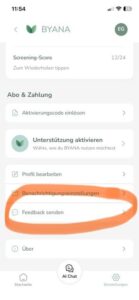
Your feedback directly shapes the way BYANA evolves. Thank you in advance for sharing your input with us.
Where can I subscribe to BYANA?
1. You can subscribe on our website: www.abo.byana.de
There, you can choose the subscription plan that suits you best and enter your payment details. After that, your subscription will be activated in the app.
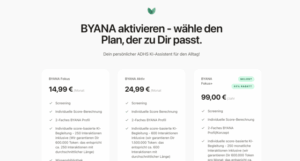
Your selected subscription will then be shown and unlocked directly in the BYANA app.
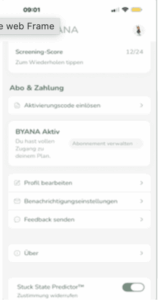
2. You can also subscribe directly through the app via Apple or Android. Simply choose your plan, start your 7-day free trial and activate your support.
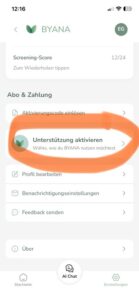
Which payment methods can I use for BYANA?
- If you subscribe directly through Apple or Google, we accept all common payment methods supported and stored by Apple or Google.
- If you subscribe directly through BYANA at https://abo.byana.de, your payment is managed via Stripe. Standard payment methods are accepted there.
I have a promo or discount code - how can I redeem it?
You can redeem your promo or discount code during the promotional period via BYANA https://abo.byana.de
Please note that promo and discount codes cannot be redeemed directly in the app.
To redeem your code, select the subscription plan that matches your promo code. Please check the conditions of your code carefully, for example which subscription plan it applies to.
After selecting your plan, enter your code in the Promo code field. Your discount will be applied immediately.
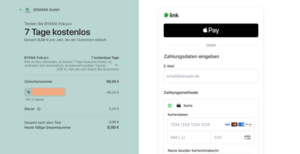
Once you have entered your payment details and completed your subscription, you will receive a one-time activation code.
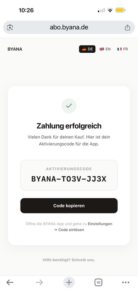 Open the BYANA app, go to your profile by tapping your initials or profile picture, then select Redeem activation code. Enter the code in the field provided. Your subscription will then be activated.
Where can I cancel my subscription?
iOS / Apple:
Go to Settings on your iPhone or iPad → tap your name → Subscriptions → BYANA → cancel.
Android / Google:
Go to Google Play → Payments & subscriptions → Subscriptions → BYANA → cancel.
Cancelling your subscription stops the next renewal. Your access will remain active until the end of the period you have already paid for.
My Premium is gone / My subscription is not recognized
Refunds & Complaints
Complaint vs. Refund – what’s the difference?
- Complaint/Support: We fix a problem (bug, access issue, activation).
- Refund: Money back – the process varies depending on the store.
I want a refund – how does it work?
- iOS (Apple): Refunds are handled by Apple: reportaproblem.apple.com → “Request a Refund”. You can also check the status there.
- Android (Google): Refunds can be requested via Google Play (Purchase → “Report a Problem”).
Can BYANA refund me directly?
- Apple: Generally no – Apple processes refunds themselves.
- Google: Refunds are initiated within the Google system.
- If you purchased through our website, the refund is processed via our payment provider Stripe.
Are there discounts or vouchers?
Yes – by invitation.
Discounts are sent out as individual codes. If you have a code, you can redeem it by following the instructions provided.
Discounts are not an entitlement, and neither discounts nor vouchers can be redeemed for cash.
Der letzte Satz ist bewusst etwas formeller gehalten – das ist bei Disclaimer-artigen Aussagen im Englischen üblich und klingt dadurch natürlicher als eine direkte wörtliche Übersetzung.
Technical issues?
The app crashes / freezes
- Close and reopen the app
- Restart your device
- Update the app (App Store / Google Play)
If the issue is reproducible: please send the steps to reproduce + device + OS version to
I’m not receiving push notifications
Check:
- Push notifications for BYANA are enabled in iOS/Android settings
- “Do Not Disturb” / Focus mode is turned off
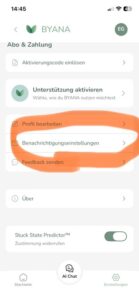
- Reminders are enabled in BYANA – you can customize your personal selection here
Content won’t load / white screen
- Switch between Wi-Fi and mobile data
- Temporarily disable VPN/ad blocker
- Update the app
If the issue persists: send a screenshot + time of occurrence to
How can I contact the BYANA team?
You can reach the BYANA team at:
When does the BYANA team respond?
We’re a growing team, and BYANA is still very much built with a lot of heart and hands-on effort – which means you get real people instead of copy-paste call centre replies.
Our target response times:
- Urgent (payment charged, no access / app unusable): as soon as possible, typically within 1–2 business days
- Everything else: usually within 2–5 business days
What should I include to speed things up?
- Device (e.g. iPhone 15 / Pixel 8)
- OS version (iOS/Android)
- BYANA app version
- Brief description + screenshot/video
- For purchases: purchase date + store (Apple/Google) + receipt
We’re so glad you’re part of the BYANA community – we hope you find joy and support with BYANA. If something isn’t working, reach out – Because You Are Not Alone!